Monday, December 3, 2012

Hack Your Notebook!

This week our post features, and is co-written, by Karyn Silverman of LREI.

We tend to think in binaries: analog or digital, make or buy. Professionally, there is a tendency to rely on outsourced solutions to save time/energy/sanity. But sometimes, a small paradigm shift is just what's needed to make pearls out of the sand in our shells. Applying a maker/hacker mindset to every day problem solving is the heart of that shift. You don't need to choose between high-tech and low-tech. Create your own middle ground: it solves the problem -- and it's fun!

You probably do your book orders online. Maybe you keep your list of books to order in a Word document or Excel spreadsheet, or maybe you are still analog and want a better system. What happens when you want your order list and your vendor interface side-by-side? Tab between windows? Clunky. Print out your order list? Waste of paper. Try to decipher scrawled pages upon pages of written lists? Aggravating.

Karyn Silverman, High School Librarian and Educational Technology Department Chair at LREI - Little Red School House and Elisabeth Irwin High School (perhaps you’ve heard of her -- Mock Printz, anyone?), was pining away for a solution for her book ordering conundrum: needing a physical list in front of her while she had her book order open on her computer screen.
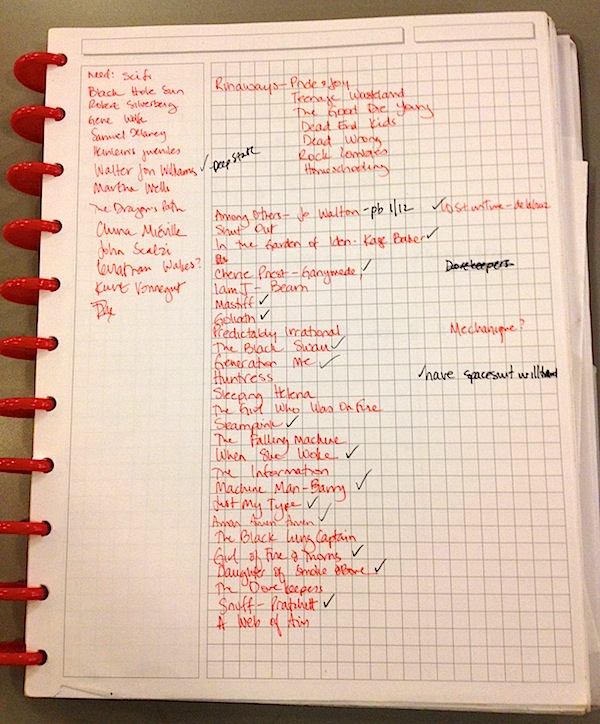
Karyn's book list solution; all
the information is there, but there
is a lack of systems thinking.
What you may not know about Karyn is that she has a small obsession with the infinitely hack-able Circa notebook system, which is pretty much the analog tool for a digital world. (Earlier this year, we helped spearhead a DIY planner initiative with the Learning Specialist at LREI using this notebook system in an effort to convert all of our students.) But her current notebook just wasn’t right for the job.


So we put our heads together, and considered the problem. We browsed the Circa refill options (and also checked the fully compatible Arc options from Staples), but nothing was right, because basically what we were looking for was an analog version of a digital tool – a simple spreadsheet with specific columns. Finally, she said, “[Expletive deleted], let’s just MAKE it!”

Following the age-old advice of Newsies, I said, “Okay, let’s do it.”

So we did!

Interested in making your own hack, combining the best virtues of analog and digital systems? Here’s how we did ours, laid out step-by-step with some annotations on our process. 

A note to the less maker-minded out there: making your own templates doesn’t take an advanced degree in design or a lot of technical skill. All you need is a word processor (we like Microsoft Word), paper, a printer, and a willingness to experiment with formatting options.

(A sense of humor and a partner in crime help, too.)
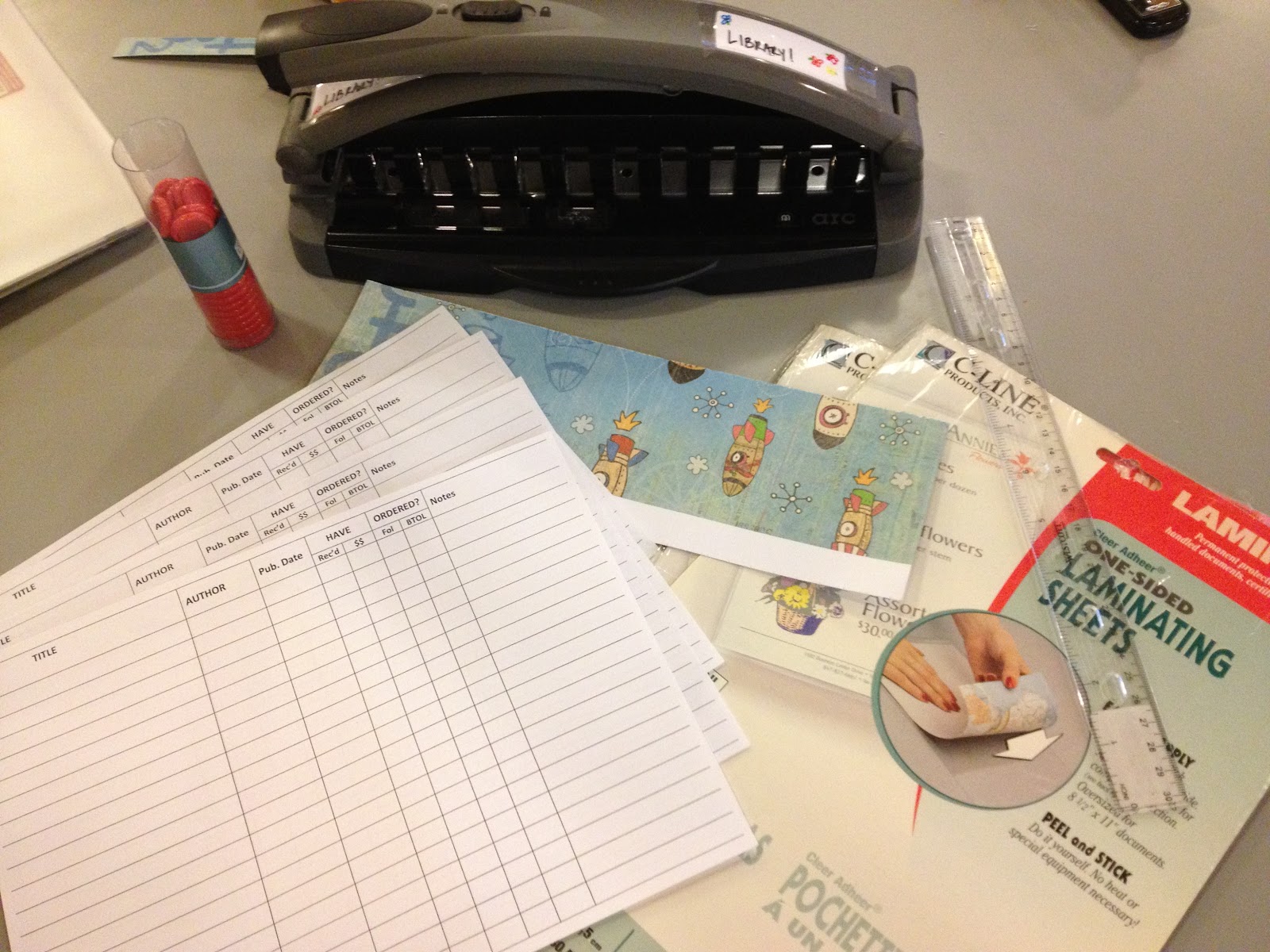
Some of the supplies used for this project.
Supplies and equipment you will need:
  • Computer with word processing (we used a Mac Air with Microsoft Word 2011)
  • Binding system (we used Levenger's Circa Discs and a Staples ARC hole punch; you could also use: binder clips, brass fasteners, or loose-leaf rings.)
  • Paper
  • Printer
  • Heavier stock craft paper and laminating machine or thin plastic suitable for a notebook cover
  • Scissors & Ruler
The process:
1. Sketch out a rough template on blank paper. Once your ideas are semi-formed, open your word processing program and start creating your template.

(The remainder of our template instructions will include Word-specific commands; adapt as needed if you prefer Pages or another program; we don't recommend Google Docs for this level of design.)

2. Go to File > Page Setup and set up your page orientation. We used landscape, because that enabled us to create a spreadsheet layout.

3. In the menu, go to Format > Document to set your margins. Before changing any of the numbers, click on Mirror Margins. This sets inside margins (closest to the notebook spine) to be a bit larger than the outside margins (closest to the edge of the notebook). This is critical if you want to use every possible bit of the page and still have room for a binding.

(Karyn and I actually decided on margins last, but in hindsight, this is best done before inserting a table to the page.) You can see our margins in the screenshot below:


4. Click on Tables in the toolbar ribbon:


5. Click on New and use the cursor to choose your table size. We eventually ended up with 8 columns and 21 rows, but we started out with a 8 by 8 table, because you can always adjust columns and rows later.

We determined that we needed the following columns: Title, Author, Pub date, Have (with sub-categories for received and purchased; because of Karyn's blog, a lot of books come to us through channels other than traditional book ordering), Ordered (with sub-categories for our two primary vendors to enable easier tracking of ordered books), and Notes (with the idea that curricular connections, review sources, or specific student or faculty names might be part of the data we wanted to collect and remember). 

You may decide that you need your template laid out entirely differently, and that’s the point: making your own template means that you control how your information is organized. It’s the maker mindset!

6. Title your columns across the top row; shorter titles allow narrower columns.

7. Adjust the column sizing by hovering your mouse over any column line until it becomes a line with two arrows, then click and drag the line to the desired width or height. In order to achieve sub-categories for the columns Have and Ordered, you can use the split and merge options in Table Layout. The functions work as advertised; split will split a single column or row, and merge will merge multiple columns or rows.


8. Add flair to your template by adjusting the palette. Add shading to your headers by clicking on Tables, and use the shading options under "Table Styles." Right click anywhere on your table, and choose "Table Properties" to change the style of the gridlines; we decided gray shading and the lightest possible gridlines was aesthetically pleasing and practical.


9. You can extend the left and right sides of the table off the page so that the lines extend as far as your printer will allow. 

After A LOT of resizing, moving, font changes, and margin adjustment (and some wasted test pages), we ended up with this:


After a final test print of an inside and outside page, we printed the template double-sided onto higher quality paper and voilà. But wait! You’ll still want to bind it. And if you also like a bit of zest in your office supplies, you’ll want to make a binding that has a bit of style. 

10. Cut beautiful paper slightly larger than 8 ½ x 11 paper. Laminate two pieces. These will be your front and back covers.

11. With the binding tool of your choice – ours was of course the specialty hole punch for Circa binding --  punch the appropriate edge of your covers and printed pages.

One of the initial challenges we faced was the desire for a notebook bound by the short edge. Short edge, top-bound notebooks exist (primarily legal pads), but we wanted a side-bound notebook laid out in landscape, something neither of us has ever seen commercially other than in photo albums.
 Making our own binding allowed the notebook to be exactly what we wanted.

The finished product. Isn't the cover paper adorable?
12. Assemble covers and paper, in our case, onto Circa rings.

13. Start using your new notebook!

This whole project took slightly over one hour (Karyn spent a large portion of that time carefully sifting through and then cutting cover paper; if you are less picky, the project time is dictated only by your table building skills, and those are pretty easy to acquire with a bit of trial and error).

During the creating process, a lot of our students came to investigate what we were doing, and were inspired to rethink their own organizational tools.

 Fresh pages, waiting to be filled in!
We hacked, we made, we taught. Win!

So what are you hacking, modding, or otherwise recreating? How does the maker mindset inspire or help you on a day-to-day basis?

Friday, November 30, 2012

2013 HVLA Scholarship

After looking over our budget for the past few years, the board has decided to give back to its members by offering an annual scholarship to be used towards professional development. HVLA is all about creating opportunities for our members to grow as librarians, be it through our meetings, listservs, or events and this will be yet another way for us to not only gain new experiences, but to share those with our colleagues.

There will be two awards given, each for $1000. One will be awarded to a student enrolled in an accredited library school graduate program and one will be awarded to a school librarian, both of which will be used towards professional development. The deadline for submission is Friday, January 11 and the recipients will be announced on Monday, February 4. Once awarded, you will have until December 31, 2013 to spend it and you will report back on your experiences through a post on the HVLA blog. If you are interested or know anyone who might be interested, please fill out one of the forms below.

2013 HVLA Librarian Scholarship

2013 HVLA Student Sholarship

The following members make up this year's Scholarship and Grant Committee:

Kerry Roeder, Professional Children's School
Susan Levine, Browning School
Kathy Hartzler, Brooklyn Friends School
Elaine Kaufmann, Village Community School

If you have any questions, please feel free to reach out to myself or any of the committee members.


Kerry Roeder

Tuesday, November 27, 2012

Someday We'll Have a Mock Printz

This time last year, HVLA was pleased to nominate Someday My Printz Will Come for the Best New Blog Edublog Award. Now we are excited to announce that we are teaming up with the Someday bloggers—and HVLA members—Karyn Silverman (Little Red School House and Elisabeth Irwin High School) and Sarah Couri (Grace Church School) for a wonderful new event. Read on for the details from Karyn:

Are you waiting for a Printz? Or maybe you have your eye on one special would-be Printz?

Do you have a short list of 2012 YA titles you feel passionate about? Want to sit in a room with like-minded folks who may disagree dramatically when it comes to the specifics?

Well, it’s your lucky day! As many of you may know, Sarah Couri and I write the Someday My Printz Will Come blog over at School Library Journal, where we analyze Printz contenders and try to predict the winners. This year, we are adding a digital mock Printz to the blog, and also (this is the good part!) planning a live and in-person "HVLA members and friends" mock Printz.

The date for this event, open to all HVLA members and associates (so bring your colleagues, friends, neighbors, etc., as long as they read YA!), is January 13; the time and place are still TBD, but we are looking at a gathering (with food) followed by intense discussion.

However, we can’t discuss everything published this year, so we need to narrow the options down.

Over at Someday, we’ve had Pyrite Printz (that’s our catchy Mock Printz name. Pyrite = fake gold, which is, you know, fake, or mock. Get it? I think I just killed the joke) nominations open for a few weeks. We’re going to use the Someday platform to collect HVLA member nominations—head over to the blog and read the nominations thus far. If your top pick isn’t yet on the list, go ahead and write up a comment to nominate it.

Oh! But first, you may want to take a minute to refresh yourself about the actual Printz purpose, policies, and procedures.

Once the Pyrite nominations close, we’ll have an HVLA vote to determine the slate of titles we’ll be discussing on the 13th. In order to give everyone ample time to read the full shortlist (we’re thinking 7-10 titles), we have a tight turnaround on getting nominations in.

(Drat Thanksgiving and all that family time that distracted me from posting this last week!)

So think fast, because we’ll be closing the nomination list at Someday at midnight on Wednesday. We’ll get the list out to HVLA members to be voted down by Friday*, with the goal of finalizing the HVLA shortlist by Monday—and leaving us all just shy of 6 weeks to get caught up on our reading, marshal our arguments, and bribe our friends so ensure we land our Printz!

Need your memory jogged as to what the top titles have been this year? Sarah and I have a list of likely contenders here, but any 2012 book is fair game!

*This will not be the same as the general poll for the blog readers, so for those who are HVLA members AND regular Someday readers (you know who you are and you know we love you!), you’ll have two chances to try to get your books on the shortlists, and two different mock events to join.

Monday, November 26, 2012

Sandy and my Information Drought


It's been four weeks since Sandy hit our area, and by now, we've all heard countless Sandy stories. At the time though, some of us found access to information scarce or difficult because of the power outages and intermittent cell phone service. My week without power began with the troubling feeling like something important might be announced—school closings, mass transit updates, power restoration plans—and I might miss it. Whenever I found cell phone service, I turned to twitter (specifically The New York Times Metro Desk) to hear from the outside world. 

Once the storm passed and the days without power stretched on, I’ll admit that there was something peaceful about being "off-the-grid," even though being without heat was not as pleasant. My husband and I played board games, we read by candlelight, and went to sleep when the sun went down. Friends with power invited us over for hot meals and showers, and we relied on them for information and news. In hindsight, the experience was a good reminder that access to information is a precious commodity, and it is important to be thoughtful about how and when we need to be plugged in. Turning off our devices every so often, stopping the constant stream of information, can remind us to thoughtfully seek out only the information that is most important to us, of the best quality, and from the most reliable sources. 

With this in mind, HVLA is hoping to use the interwebs for post-Sandy school library relief. We encourage all HVLA members to fill out this quick survey, so we can match schools in need with those offering resources. 

Tuesday, November 20, 2012

HVLA Fall Meeting REMINDER: November 28

Our Sandy-postponed fall meeting is coming soon! Details below:

Who: 
HVLA in partnership with the New York City School Librarians Association and the McNally Jackson Bookstore.

What: 
We will gather at the McNally Jackson Bookstore at 4:30 pm for a brief HVLA business meeting. The McNally Jackson event will begin immediately following our meeting. This is an opportunity to share ideas over food and drinks, preview fall and winter titles, and meet-and-greet authors and illustrators.

Where: 
McNally Jackson Bookstore
52 Prince Street
New York, NY 10012
(between Lafayette and Mulberry)

When: 
Wednesday, November 28 @ 4:30 pm


We look forward to seeing you there!

Monday, November 19, 2012

December Book Club

Date/Time:
Thursday, December 6, 5:30pm

Location:
Elisabeth Irwin High School -- In the library!
40 Charlton Street
(between 6th Ave & Varick)

What We're Reading:
The Raven Boys by Maggie Steifvater
The Spindlers by Lauren Oliver


Sunday, October 28, 2012

Solo Act Wrap-Up: 30 Second Insights


The Solo Act:  Wrapping Up with “30-Second Insights” from leaders in School Librarianship...


Dear HVLA Members,

I hope you’ve enjoyed this series on solo librarianship in school libraries. It was very interesting for me to research the literature and blogging out there on the subject and I certainly hope my sharing it with you left you with some worthwhile information and food for thought.

Just last week I had the opportunity to travel to LA to receive training for librarians in IB (International Baccalaureate) schools since my school is an IB candidate. The expressed importance of networking and professional development experiences throughout the literature I shared with you reverberated through my thoughts...This training experience was the first face time I’ve had with librarians in several months, and it was truly refreshing. For several days we shared resources, best practices and our experiences. Not only did it afford me the chance to establish some professional connections I will nurture and have for some time to come, but it granted me a feeling of solidarity that is missing in my daily life at school.

It is difficult to get time out of school--or time away from the responsibilities we have to our loved ones--to attend conferencing and tricky, for many of us, to gain access to the funding necessary to do so. It must be prioritized, though, even if it means setting a goal to attend just one of these events per year. These experiences pay dividends down the line that can sometimes turn out to be invaluable.  In the meantime, your local library associations can provide the missing face-time between professional development conferences.

In the spirit of solo librarianship I now leave you with a link to AASL’s “30-Second Insights” from leaders in our national professional community of school librarians who were posed the question:

What is one traditional activity school librarians should stop doing in order to increase time for strategic activities?

I think you’ll find their answers interesting and informative for your daily practice.

http://www.ala.org/aasl/aaslpubsandjournals/knowledgequest/aboutkq/30second_NovDec11


Enjoy!

Warmly,
Laura Bishop, Membership Coordinator (2011-2013)